
Guide
Using Katha Studio
Write a serial, send each chapter for review, schedule when it goes out, and request translations. This guide follows the editor as it works today.
- Who can use it
- Approved Katha creators. Apply through Publish.
- Where it runs
- A laptop or desktop browser. Reading works on any device.
- Before a chapter goes live
- A Novira reviewer approves it.
- Translation
- 26 languages, paid with expansion credits.
Before you begin
Writing on Novira needs an approved creator account. Apply through Publish; Novira reviews each application.
When your application is approved you receive 15 expansion credits, which pay for translating chapters. One more credit is added when your first chapter is published. Each grant happens once.
Your writing stays yours. Novira does not claim ownership of your stories and will not use them to train third-party generative AI models without your consent (Terms, section 3). When you use translation or the AI assistant, the relevant text is processed by the AI services that produce the result; the Privacy Policy explains what is shared.
Writing and publishing a chapter
-
Create the story
Set the title, description, cover, genres and the language you write in. The story holds your chapters.
You can also choose the languages you plan to translate into. Choosing them is free; translation is charged per chapter when you request it.
-
Open the editor
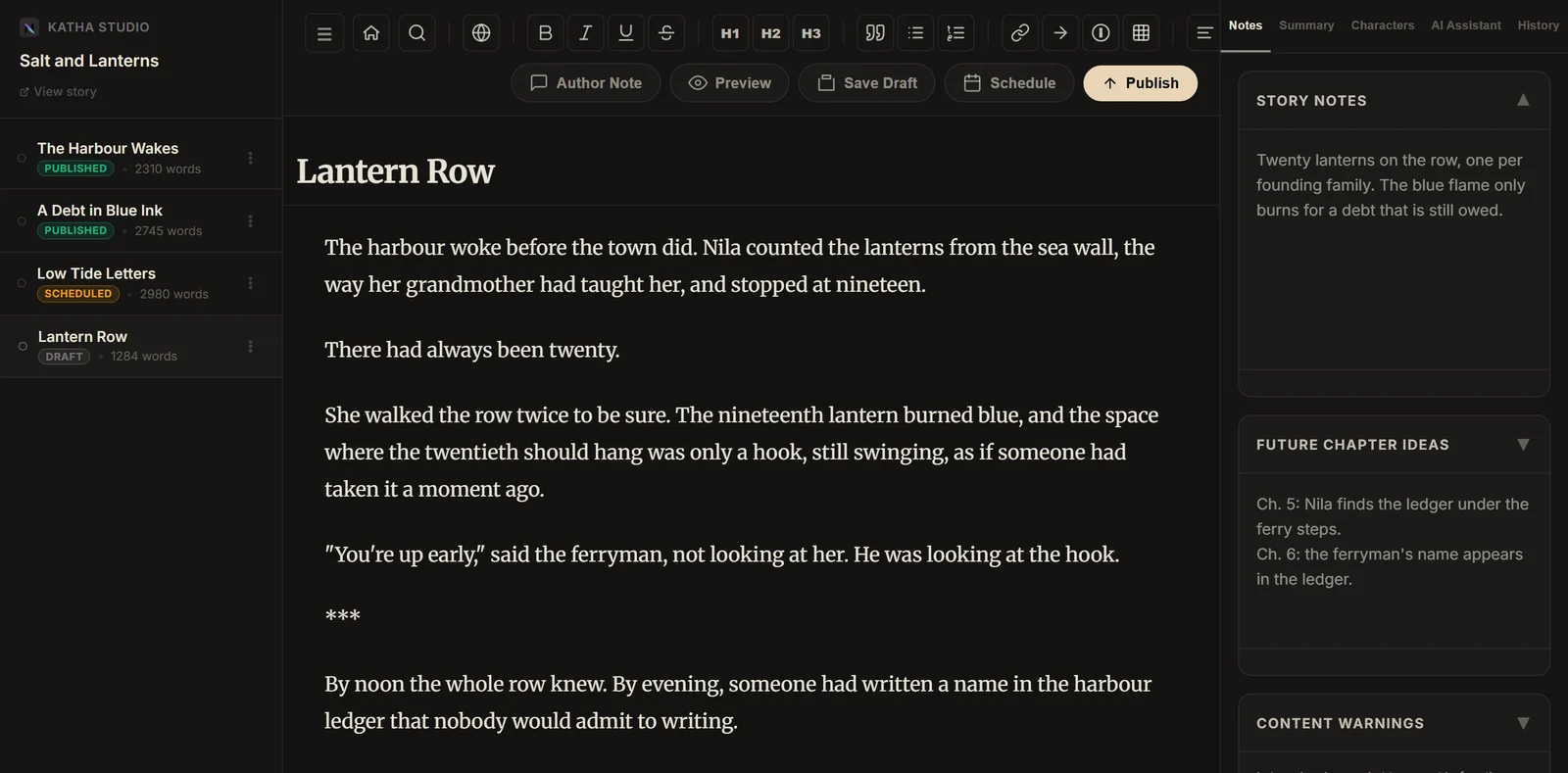
-
Write and format
The toolbar covers headings, bold, italic, underline, strikethrough, lists, blockquotes, links and scene breaks. Focus Mode hides the panels, and typewriter focus keeps the line you are typing in place.
Your work saves automatically. A copy is also kept in your browser, so text typed during a dropped connection can be recovered when you return. The chapter goal shows your word count against the target you set.
The tools on the right keep notes, a chapter summary and your character list beside the text.
-
Add the chapter details
- Author note: shown to readers with the chapter.
- Content warnings: set in the Notes tab and shown to readers before the chapter starts.
- Release time: leave it empty to publish as soon as the chapter is approved, or use Schedule to pick a time at least two hours ahead.
-
Send it for review
Press Publish. This sends the chapter to Novira for review; it does not go live straight away. The button changes to Pending Review.
The text locks while the chapter is pending review, scheduled or published. Read it through, including the author note and warnings, before you press Publish.
-
Review and release
A reviewer checks the chapter against the content guidelines and for formatting problems, such as broken paste or a scene cut off mid-way. Review time varies, so leave room before a scheduled release.
- Approved with a release time: it publishes at that time.
- Approved without one: it publishes immediately.
- Not approved: it returns to Draft with the reviewer's feedback shown in the editor, and you receive an email. Make the changes and press Publish again.
Chapter status
- Draft Editable Private to you. Saves as you write.
- Pending review Locked With a Novira reviewer.
- Scheduled Locked Approved, waiting for its release time.
- Published Locked Live for readers.
Not approved? The chapter goes back to Draft with feedback, and you can edit it again.
Need to fix a published chapter? Contact Novira.
Translating a chapter
You can request a translation once a chapter has been published for 7 days. Chapters translate in order: to translate chapter 5 into Hindi, chapter 4 must already be published in Hindi.
Available languages (26): Hindi, Bengali, Tamil, Telugu, Kannada, Malayalam, Marathi, Gujarati, Punjabi, Odia, Urdu, Japanese, Korean, Chinese, Indonesian, Filipino, Vietnamese, Thai, Spanish, Portuguese, French, German, Italian, Russian, Arabic and Turkish.
What it costs
Translation uses expansion credits. They are a separate balance from Novira Translate credits, and the two cannot be exchanged.
credits = ceil(chapter words ÷ 500) × number of languagesA 2,000-word chapter:
Credits are reserved when you make the request. If the request cannot run, for example because an earlier chapter is not translated yet, they are returned.
How a translation reaches readers
An AI draft is produced first. A Novira reviewer then checks and edits it, and Novira publishes it. You do not need to approve or publish translations yourself.
To keep names consistent, each translation uses a list of your characters' names taken from your earlier chapters.
Current limits
- No mobile editorWriting and chapter management need a laptop or desktop.
- Review before releaseChapters are never published instantly, so plan releases with time for review.
- No edits after you press PublishPending, scheduled and published chapters are locked.
- Names in translationCharacter names are applied automatically, but an unusual name can still come out differently between chapters.
If something goes wrong
- The editor does not open on my phone
- That is expected. Sign in with the same account on a laptop or desktop.
- I pressed Publish but the chapter is not live
- Publish sends the chapter for review. It goes live after approval, at your scheduled time if you set one.
- I cannot edit a chapter I submitted
- Chapters lock once they are pending review, scheduled or published. If it was not approved, it returns to Draft and unlocks. For a published chapter, contact Novira.
- My chapter came back to Draft
- The reviewer did not approve it yet. Their feedback is shown at the top of the editor and in the email you received.
- My scheduled time was rejected
- Scheduled times need to be at least two hours ahead. Choose a later time.
- I cannot request a translation
- Check three things: the chapter has been published for 7 days, the previous chapter is already translated into that language, and you have enough expansion credits.
- My translation is not visible to readers yet
- Novira reviews every translation before publishing it. It appears once that review is complete.