Guide
Using Novira Translate
Translate comic, manga and webtoon pages you have the rights to. Upload the pages, choose the languages, correct the result in the editor, and download the finished pages.
- Who can use it
- Anyone signed in to Novira. Your comic does not need to be published here.
- Free credits
- 30 credits for new accounts, given once.
- Languages
- 23 target languages.
- What you pay for
- Total image area, not the number of files.
Before you begin
Sign in, then open Translate. Novira Translate has its own credit balance, separate from the expansion credits used for Katha and Chitra stories. The two balances cannot be exchanged.
Only upload pages you have the right to translate. Novira does not claim ownership of your pages and will not use them to train third-party generative AI models without your consent (Terms, section 3). Your pages are processed by the AI services that read, translate and letter them; the Privacy Policy explains what is shared.
Translating a chapter
-
Upload your pages
Drag the files onto the upload area, or choose Add files.
Formats JPG, PNG, WebP, GIF File size Up to 15 MB per image Files per job Up to 50 Page shapes Single pages and long vertical strips -
Choose the languages
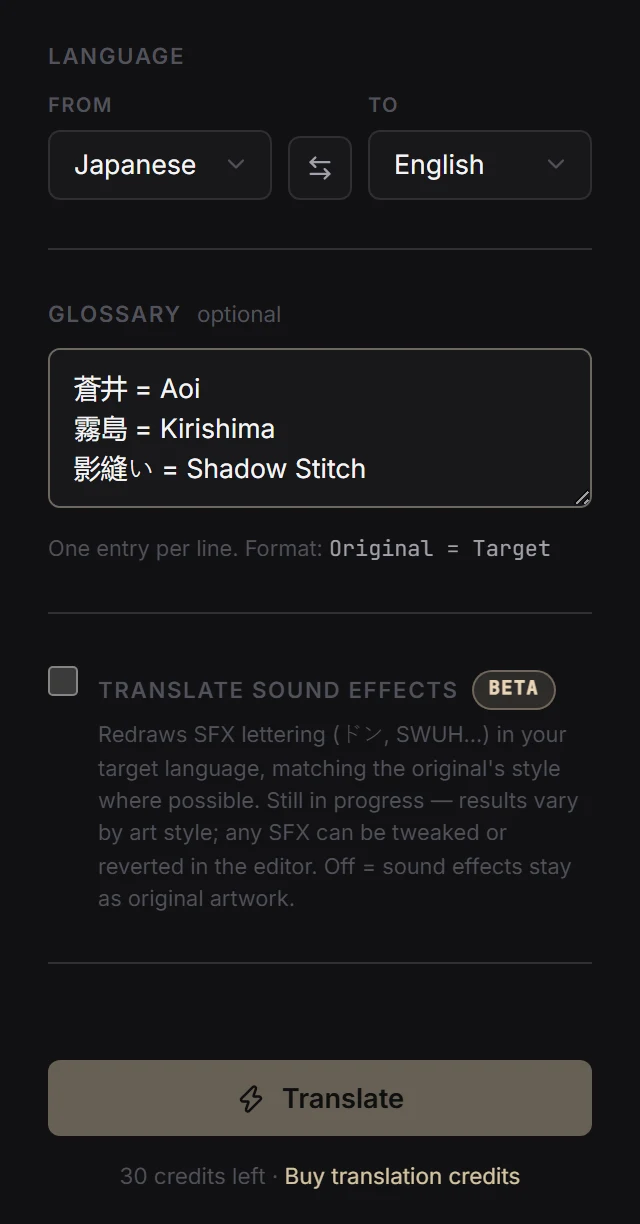
Set From and To. The source starts on English; switch it to the language of your pages, or pick Auto-detect.
Reading order follows the source language. Japanese pages are read right to left, as manga is. Other languages are read left to right, top to bottom. You can correct the order in the editor.
-
Add a glossary
Each page is translated on its own, so without a glossary a name can be spelled one way on page 3 and another way on page 9. Add character names, places and special terms, one per line, as
Original = Target. -
Decide about sound effects
Translate sound effects is off by default and marked beta. When it is on, Novira redraws sound-effect lettering in the target language and follows the original style where it can.
Results depend on the art. Sound effects drawn over detailed screentone, hatching or hair are the hardest to clean behind. You can adjust or revert any translated sound effect in the editor. With the option off, sound effects are left exactly as drawn.
-
Translate
Press Translate. Each page goes through five stages:
- ReadFinds the text on the page and reads it.
- UnderstandWorks out what each text area is: a balloon, a caption, a sound effect, a screen or sign, a watermark, or artwork.
- TranslateTranslates the dialogue in reading order, applying your glossary.
- CleanRemoves the original lettering and fills in the art behind it.
- LetterSets the translation inside each balloon, and on screens and signs field by field.
Watermarks and site credits are kept as published. Effect lettering drawn into the art, such as GAME OVER, follows the sound-effects setting. Names and titles that stay the same in your language keep their original lettering. The review panel in the editor shows what Novira understood on each page and anything it kept for you to check.
-
Check and correct
Every page opens in the editor. From there you can:
- Edit the text of any bubble
- Re-translate one bubble from the original, or re-translate all of them
- Use AI Clean Up to fix colour, overflowing text and leftover lettering
- Use Erase (Box) to remove leftover original lettering by hand
- Add Bubble where text was missed
- Use Order to click the bubbles in reading order, then Apply order
-
Download
Choose Apply edits, then Download ZIP to get every translated page as an image.
How credits are charged
One credit covers one standard page: 800 × 1280 pixels of image area. A job costs:
credits = ceil(total image area ÷ 1,024,000 pixels)The minimum is one credit per job. Because the charge is based on area, how your files are cut makes no difference:
4 credits either way
Credits are reserved when you press Translate. If the job cannot start, for example because the service is starting up, they are returned automatically. If your balance is too low, the job does not start and nothing is charged.
Current limits
- Lettering styleColour, outline, size and slant follow the original when they can be measured reliably. Painted or heavily textured lettering is kept as drawn.
- Sound effectsSound-effect translation is in beta, and results vary with the art.
- Unclear textText too small, blurred or cut off to read reliably is kept as drawn and listed for review, never guessed.
- Names across jobsPages in one job share names and earlier dialogue. Use the glossary to keep spellings the same across separate jobs.
- Image outputDownloads are finished images, not layered or editable files.
If something goes wrong
- “Not enough translation credits to translate this chapter.”
- The job did not start and nothing was charged. Check your balance on the Translate page, or remove some pages.
- “Translation service is starting up. Please try again in 30 seconds.”
- The service was restarting. Your reserved credits were returned. Wait a moment and press Translate again.
- A name is spelled differently on different pages
- Add it to the glossary, then re-translate the affected bubbles or the whole job.
- One line reads badly
- Select that bubble and edit the text, or re-translate just that bubble.
- Dialogue landed in the wrong bubble
- The reading order was guessed wrong. Use Order, click the bubbles in the right sequence, then Apply order.
- Some original lettering is still visible
- Run AI Clean Up on the page, or use Erase (Box) over the leftover text.